
All in one monitoring for Laravel
Track exceptions.
Track issues.
Monitor performance.
Laritor is a bug tracking and performance monitoring tool for Laravel. It helps you find exceptions, failed jobs, and slow requests, and shows the queries, logs, and other events behind each problem.
Use it just for exceptions, include other problems like failed jobs and slow requests, or Observability platform. You choose how much gets recorded.
Connect your AI coding agent to Laritor’s MCP server to investigate and fix problems in your laravel application.
Free trial: 300K events · Unlimited apps and users
Exception recorded
PaymentGatewayException
The payment provider returned an error.
app/Services/CheckoutService.php:42Request timelineEvents and time taken
- Request started
POST /checkoutRequest - Order retrieved
select * from orders where id = ?Query · 12ms - Payment started
Order details added to the logLog - Payment provider failed
POST api.payment-provider.comHTTP 500 · 280ms - PaymentGatewayException
CheckoutService.php:42Exception
Example request with an exception
Use Laritor how you want
Use Laritor to track bugs,
issues, or performance.
You can use Laritor just for exceptions, include failures and slowdowns, or monitor all activity. Each option saves the details of the requests, jobs, and commands it records.
Issue Tracker
Use Laritor as a dedicated issue tracker to monitor exceptions, failed jobs, slow requests, and other application problems. When an issue occurs, Laritor captures the full context, including all events from the affected request, job, or command, to help you identify and resolve the problem. Activity without issues is ignored.Full Observability
Use Laritor as a full-scale observability platform to monitor everything happening in your application. Laritor captures all activity, including successful operations, exceptions, failed jobs, slow requests, and performance metrics, giving you complete visibility to identify bottlenecks, troubleshoot issues, and optimize application performance.From alert to fix
Fix issues in minutes.
Get an alert, find where the issue is, inspect the entire request journey, and fix it with your AI agent by connecting to Laritor MCP.
-
Get an alert
Receive an alert in Slack, email, or your preferred channel when an issue occurs in your Laravel app. Open it to start investigating.
View larger screenshot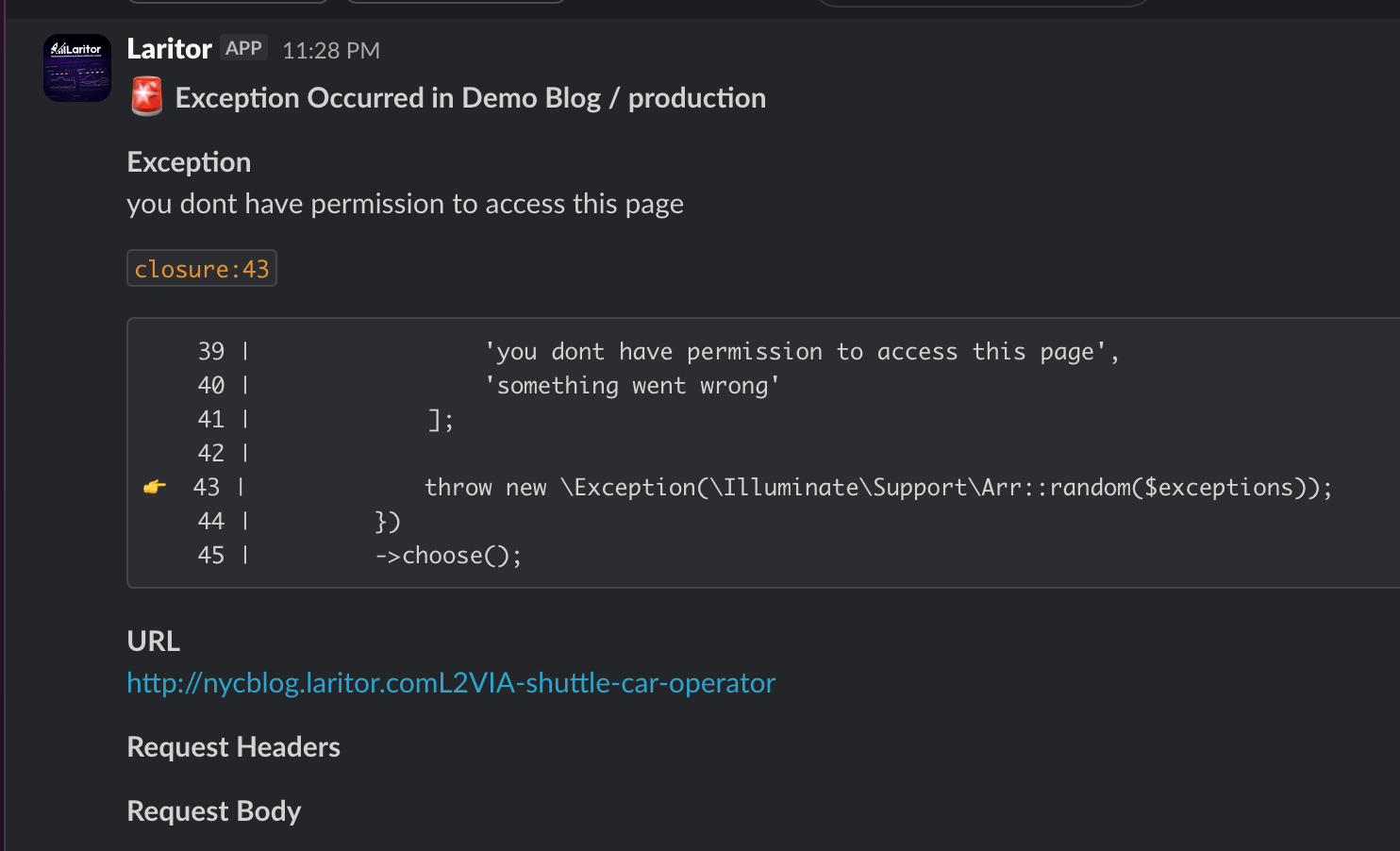
-
View the file, line, and stack trace
See exactly where the exception occurred, with the file name, line number, surrounding code, and full stack trace.
View larger screenshot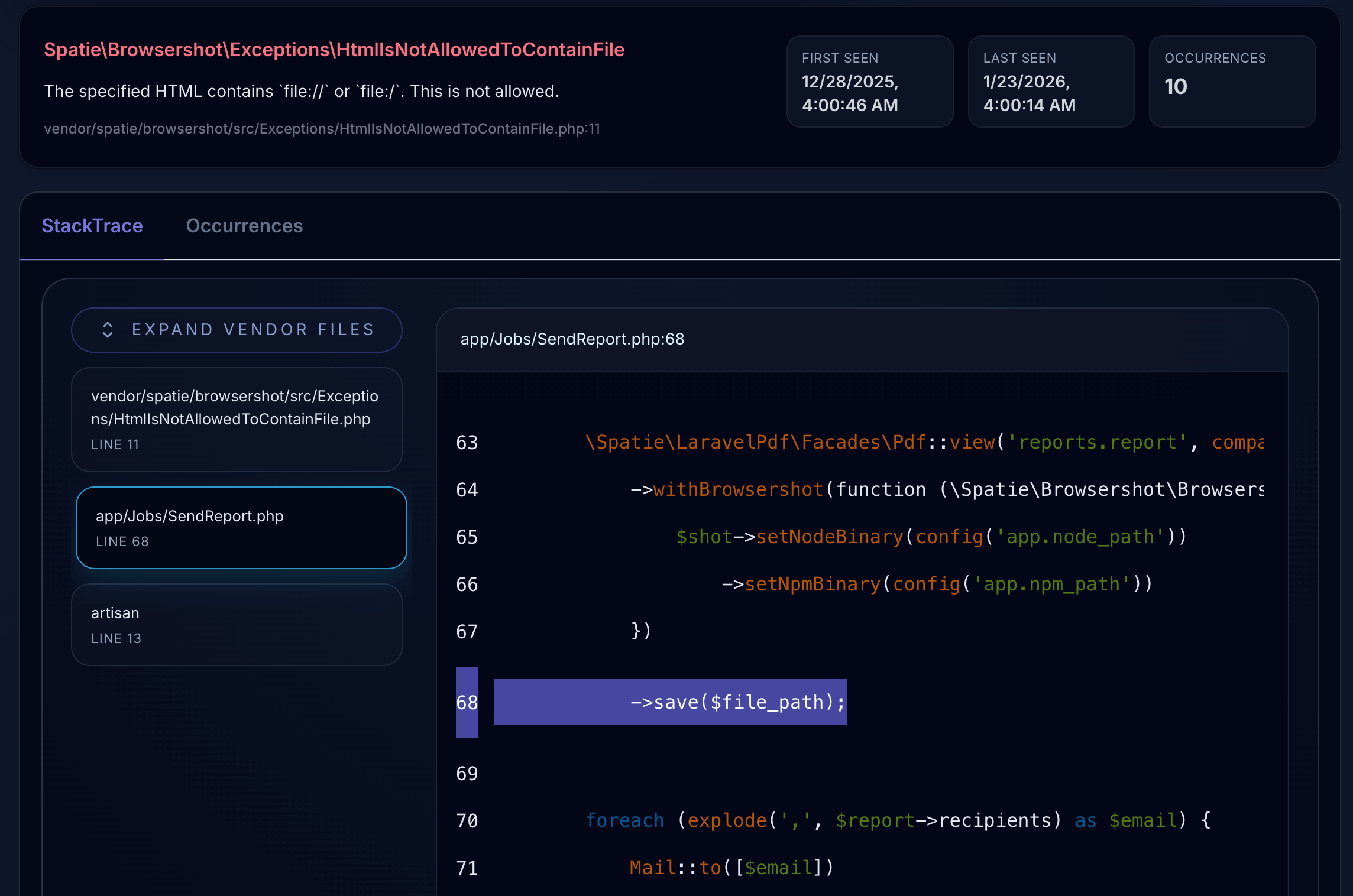
-
Inspect the entire journey
Follow everything that happened in the request, job, or command that raised the exception. Inspect its queries, logs, cache operations, API calls, and other events to identify the root cause.
View larger screenshot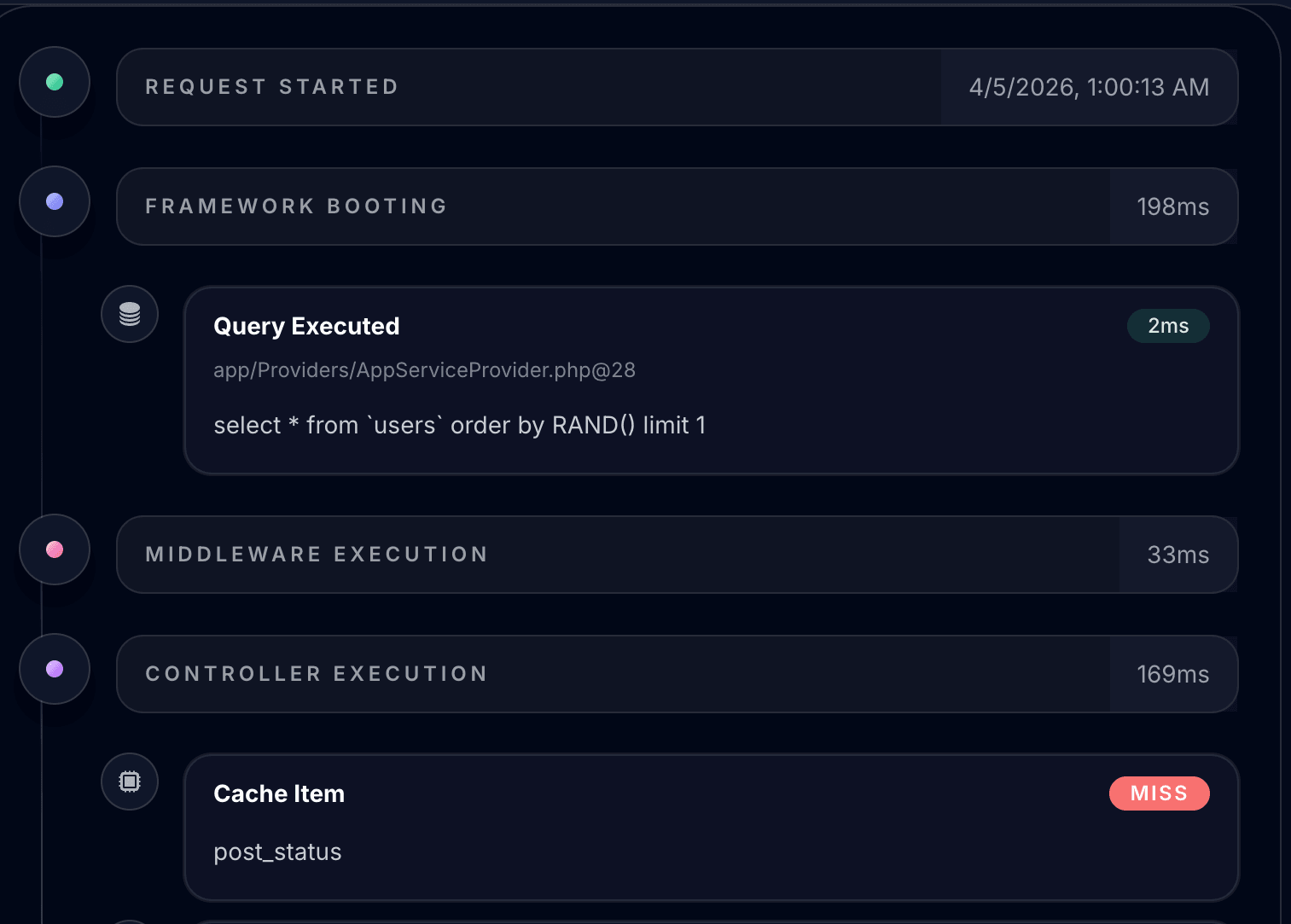
-
Fix it with Laritor AI or your AI agent
Use Laritor’s in-app AI recommendations, or connect your AI coding agent through Laritor MCP.
Laritor MCP gives your agent the exception details, full stack trace, and entire recorded request or job timeline, including queries, logs, and other events. Your agent can use this context with your code to understand the cause and implement a fix.
View larger screenshot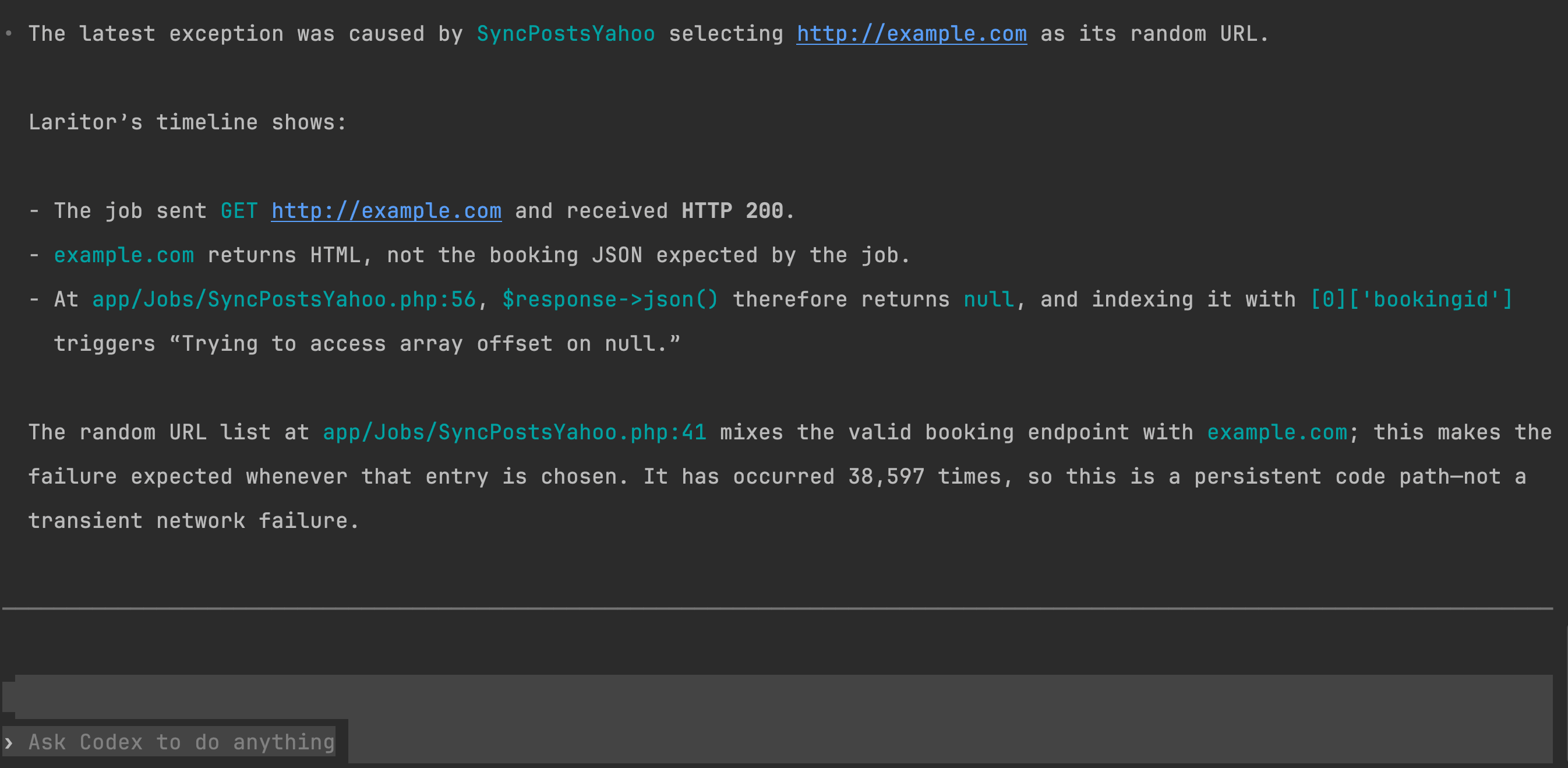
Alerts and integrations
Get notified where
you need to.
Receive alerts about exceptions, failed jobs, slow requests, and other problems in the tools you already use. Send messages to your team, create issues in GitHub or Linear, or connect your own tools with webhooks.
Choose what triggers an alert and where it goes for each app and environment.
Set up alertsIssue tracking
Track problems
beyond exceptions.
Find failed requests, failed jobs, slow requests, slow queries, and other issues in one place.
With issues-only mode, Laritor saves all events from each request, job, or command with a detected problem. Open an issue to see the related queries, logs, and other events and find out what went wrong.
Activity with no detected issues is not sent.
Set up issue tracker mode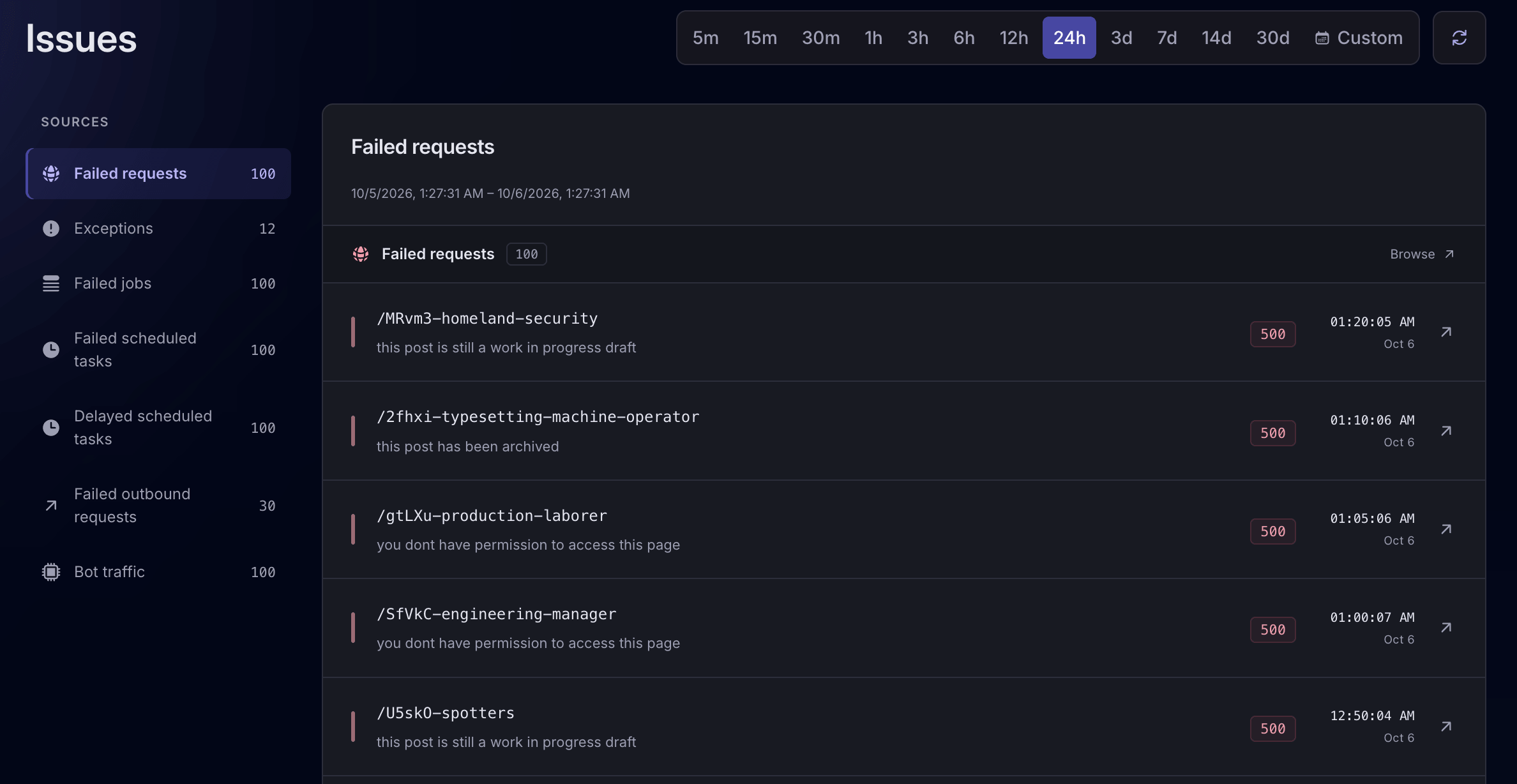 View larger screenshot
 Full observability
See how your whole app performs.
Record successful activity as well as exceptions and issues. Monitor requests, queues, and database queries over time, then open any recorded request or job to see its related events.
Understand your app’s performance.
Track request volume, response times, memory use, and successful or failed responses over time. See how long Laravel takes to start, run middleware and controllers, and render responses. Check query counts and times, spot N+1 and duplicate queries, and see exception totals.
Explore application performance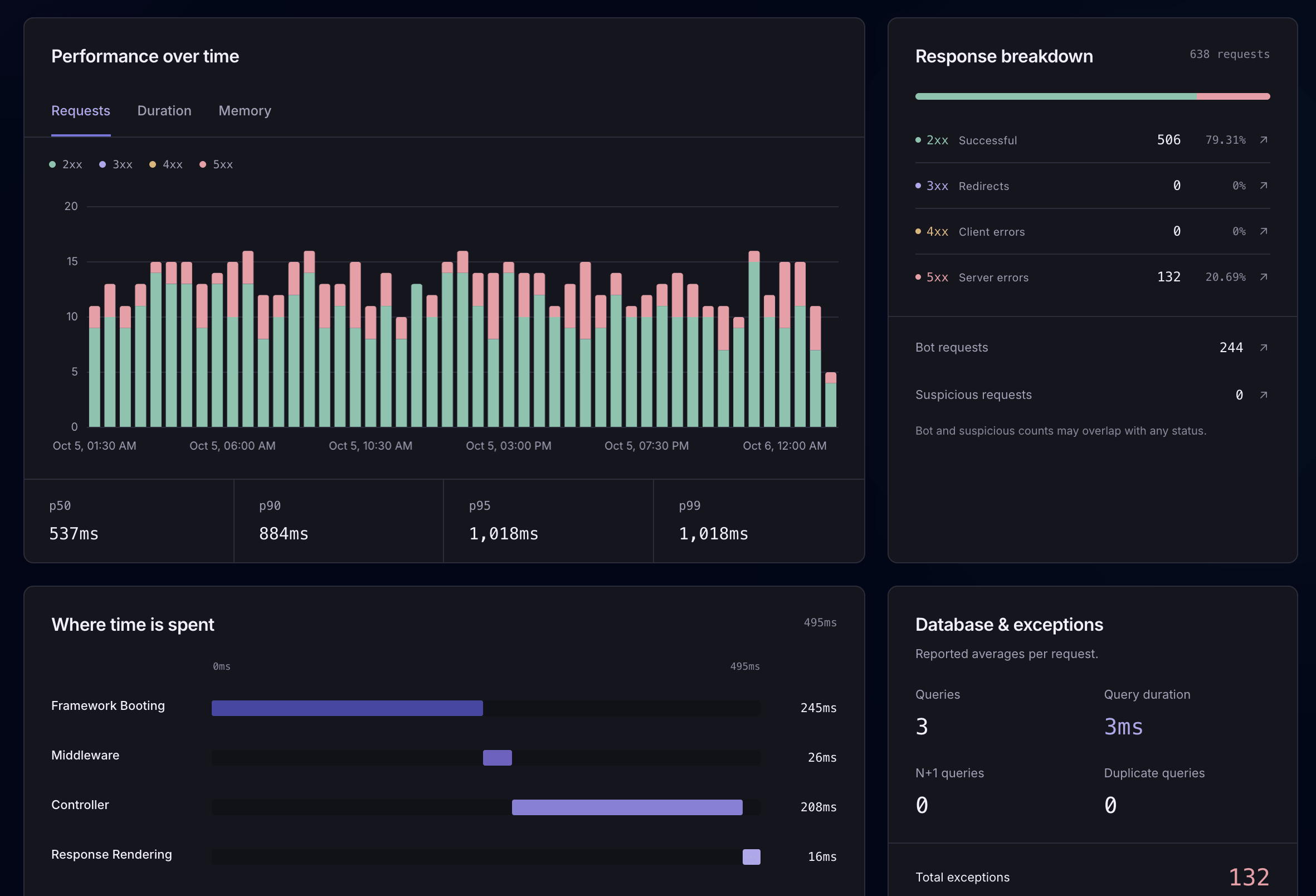
See the bots reaching your app.
Inspect bot requests, IP addresses, user agents, and the routes they visit. Understand unwanted traffic and use the details to improve your filtering rules.
Explore request monitoring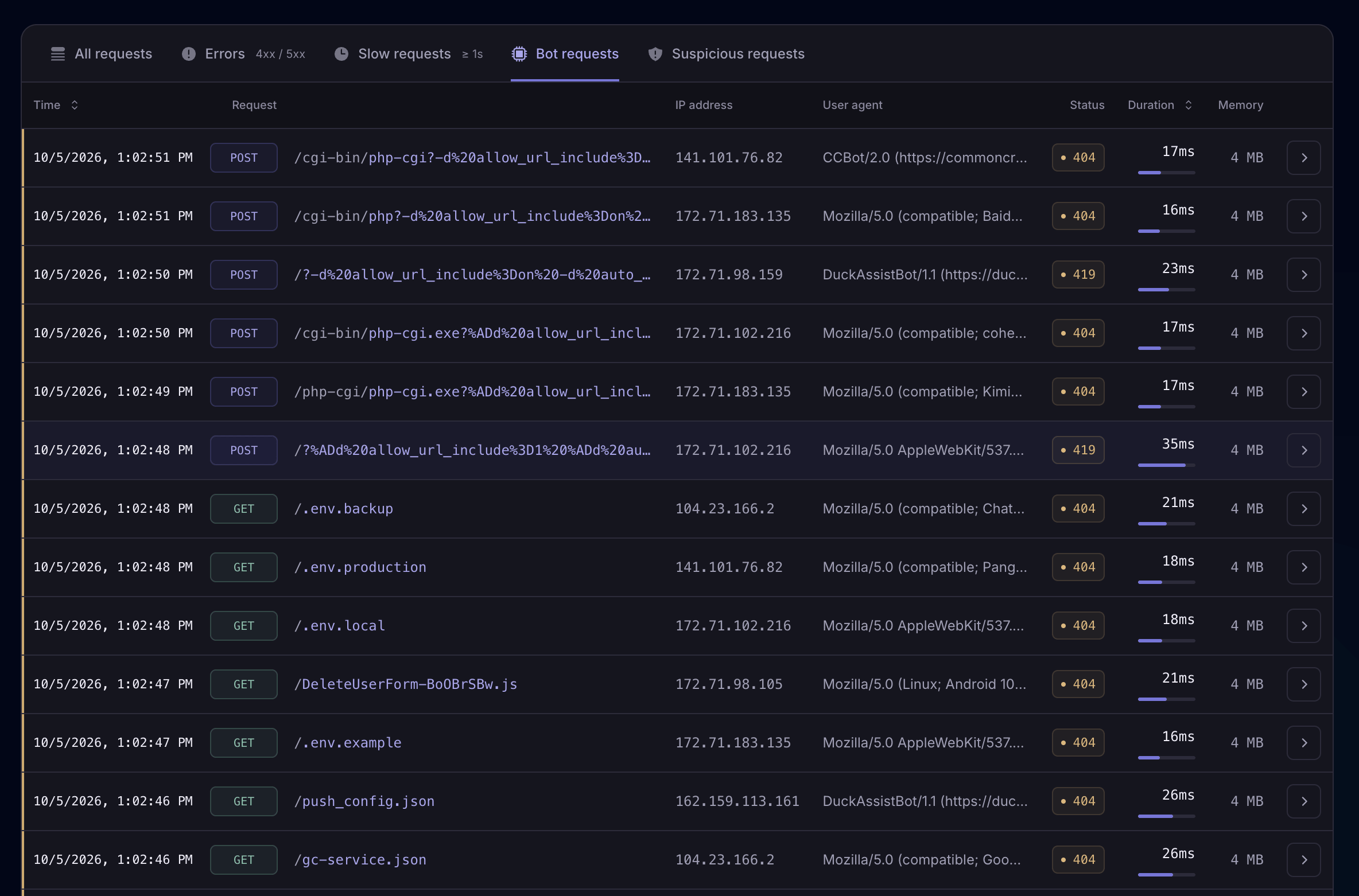
Find out why jobs are backing up.
See processed, failed, and waiting jobs for each queue. Track how long jobs wait and how long they take to run, then open a job to investigate.
Explore queue monitoring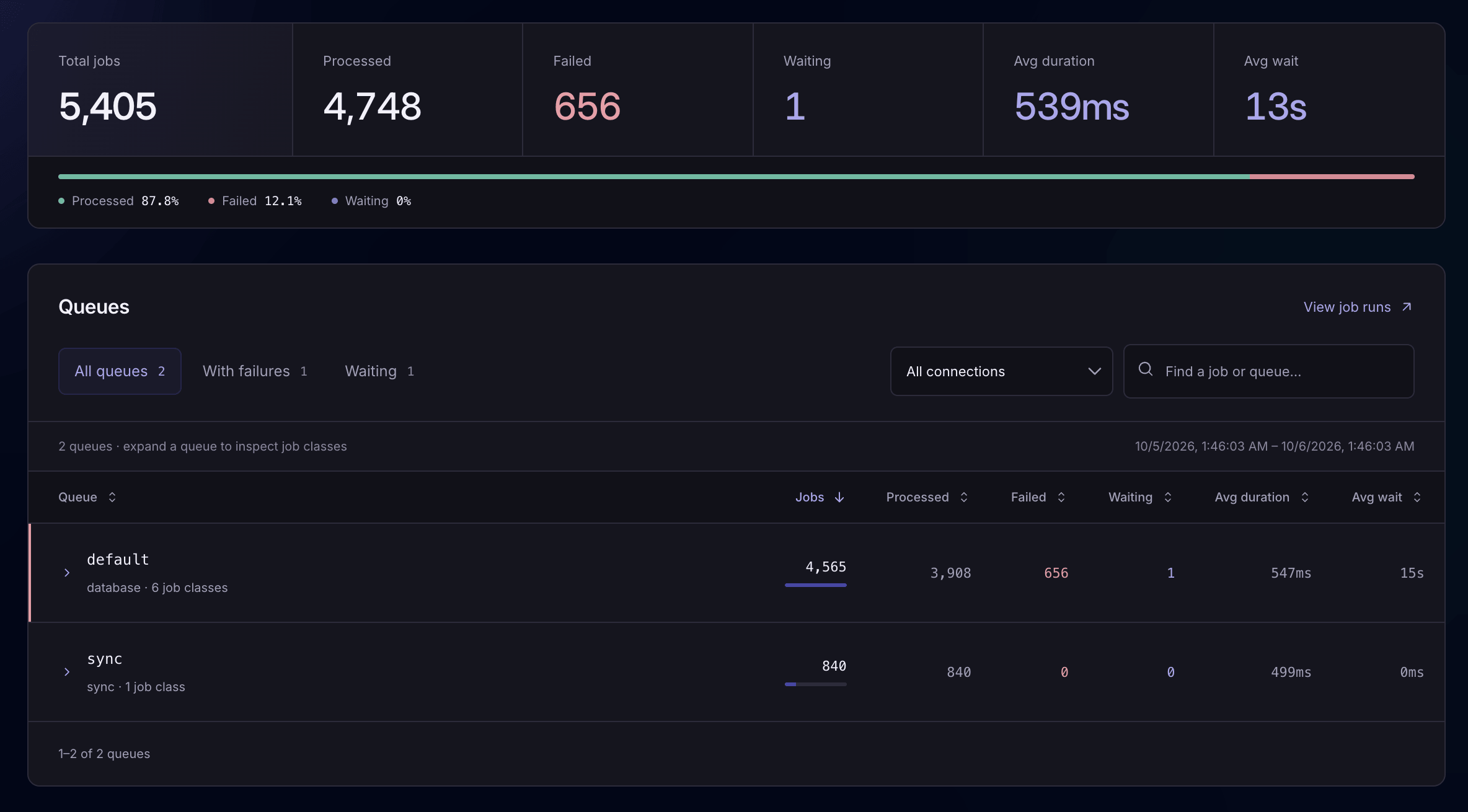
Understand how your features behave.
See how often feature flags are active or inactive. Compare request times and errors with a flag on or off, and inspect the requests where it was checked.
Explore feature flag monitoring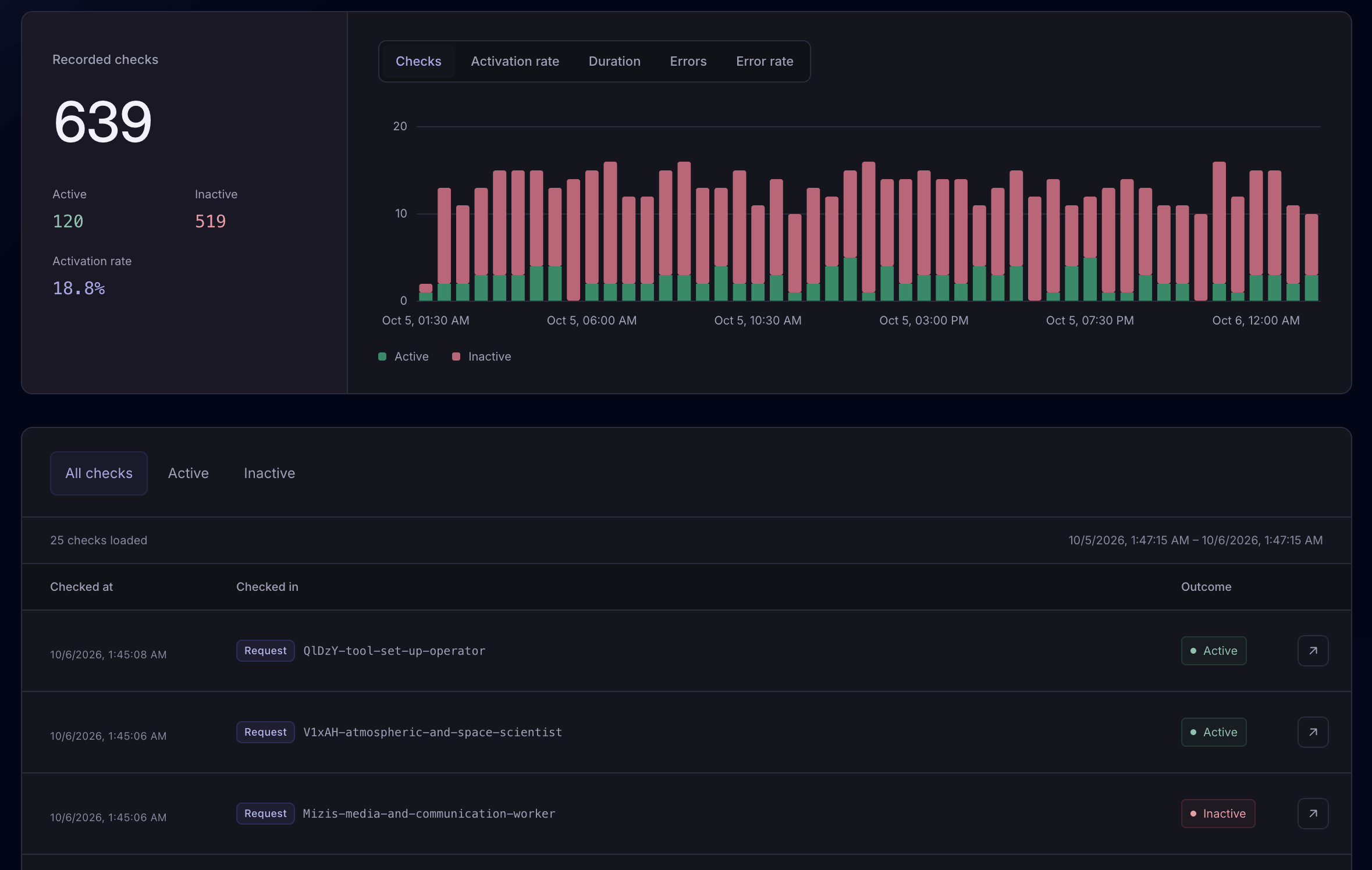
Check the services your app depends on.
Define health checks for your APIs, queue workers, and other services. See which checks pass or fail, with their output and how long they took.
Explore health checks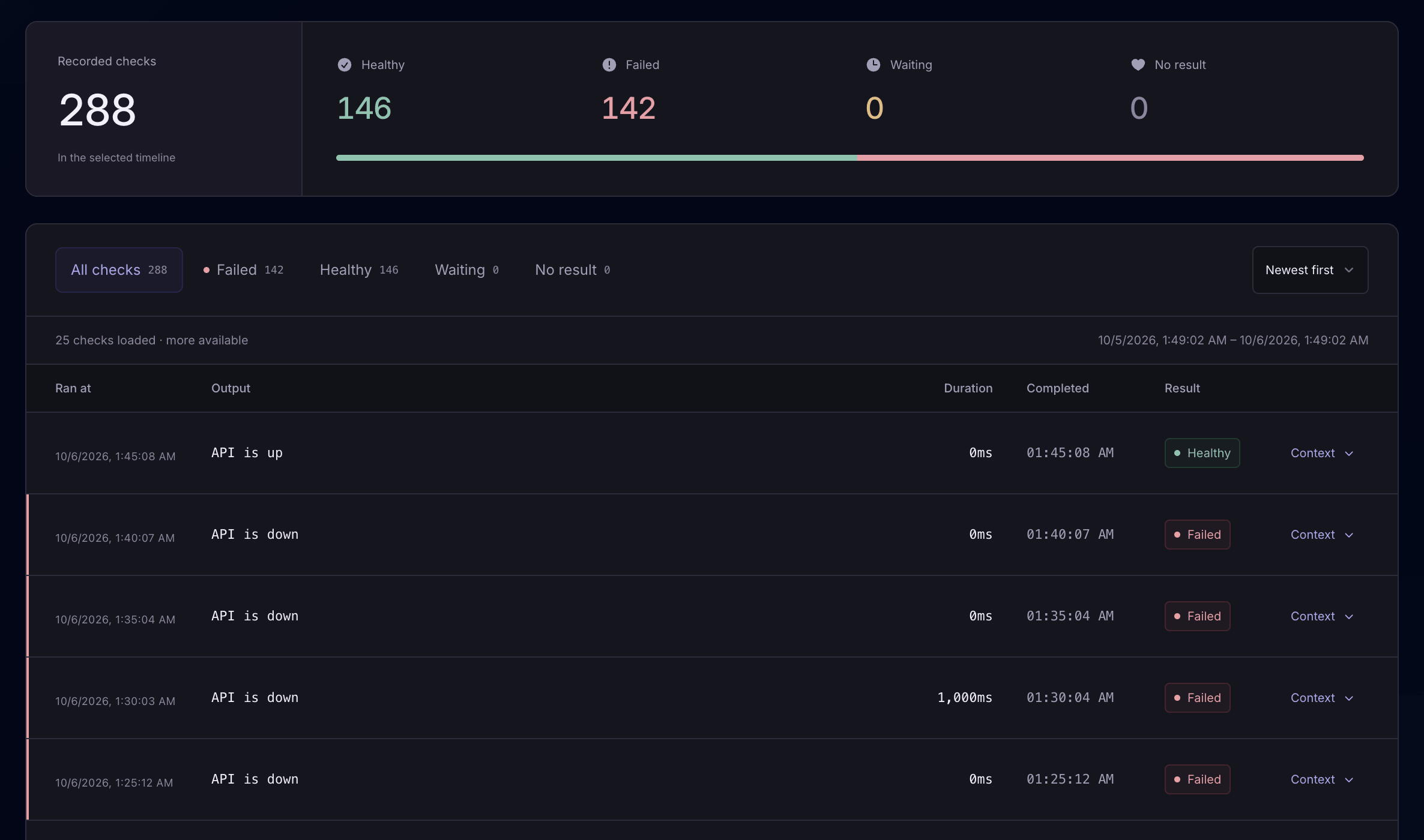
Full application monitoring
Every event is connected.
Laritor connects every event in your Laravel application to its request, job, command, or scheduled task. See related events together for a full picture of what is happening inside your application.
Made for Laravel
Why Laritor?
Simple to install, flexible to use, and built around your Laravel app.
Spend less on monitoring
Laritor is 60% cheaper than alternatives. Record only the activity you care about to keep costs down. Every mode includes all Laritor features, with unlimited apps, users, alerts, and dashboards.
See pricingInstall in under 1 minute
Install the Composer package, add your endpoint and key, and choose what to record. No separate agents or infrastructure changes are required.
See installation stepsDebug faster with MCP Server and In-app AI
Get in-app AI suggestions to fix exceptions and improve performance. Connect your AI coding agent through Laritor MCP to investigate and fix problems with the full context of your recorded events.
Explore Laritor MCPUnderstand each user’s journey
Inspect all recorded requests a user made during a session, from their entry page to their exit page. Add custom events for actions like checkout steps or payment retries to understand their journey in more detail.
Explore session journeysCustomize your dashboards
Create unlimited dashboards with 85+ widgets for app performance, business metrics, and custom events. Add, move, and resize charts to show what your team needs to see.
Explore dashboardsCustom daily and weekly reports
Choose the metrics you want and receive a performance snapshot by email each day or week. Keep tabs on your app without logging into Laritor, and share PDF snapshots with your teammates.
Explore scheduled reportsSetup
Start monitoring in under 1 minute.
Install the Laravel package, add your endpoint and key from the Laritor dashboard, and set up a recording mode. The installation guide explains each step.
Follow the installation guide01 / Install the package
composer require binarybuilds/laritor-client02 / Add your endpoint and key
LARITOR_ENABLED=true
LARITOR_INGEST_ENDPOINT=your-ingest-url
LARITOR_BACKEND_KEY=your-backend-key
03 / Set up a recording mode
php artisan make:laritor-filter exceptions-onlyphp artisan make:laritor-filter issues-onlyphp artisan make:laritor-filterRun the command for your mode, then register the generated filter in AppServiceProvider. Complete the installation steps, including running laritor:sync after deployment.
From Laravel developers
What developers say about Laritor.
I have tried Laritor in action on one of my projects, and it's really good. It gives observability of the whole Laravel project and various operations. Totally recommend!
Povilas KoropLaravel Daily
I’m genuinely impressed with the overall experience. The service has been smooth, reliable, and incredibly helpful for our workflow. I also want to especially highlight the support team - they’ve been outstanding. Their responses were quick, clear, and genuinely helpful. They guided me properly through every issue, and I’m honestly super impressed by how supportive and proactive they’ve been throughout the process.
Awais KhalidTTW Digital
Laritor gives me clear visibility into what is happening in production, including exceptions, suspicious requests, and bot scanner activity. With those insights, I can create better WAF rules and keep unwanted traffic properly filtered.
AdinataMID Teknologi Digital
Pricing
Track what you care about.
Pay for what you record.
Choose exception tracker, issue tracker, or full observability, and filter out events you don’t need. Keep the details that matter without the noise. Every mode includes all Laritor features. Paid plans start at $20/month with 20 million events included.
Free trial
$0 to try Laritor
Evaluate Laritor
Try for free- 300K events
- Unlimited apps, environments, servers, and users
- Unlimited alerts, dashboards, and reports
- Keep recorded data for 14 days
Pay as you go
$20 / month
For ongoing use after the free trial.
Get started- 20 million events / month
- $0.20 per extra 100K events
- Keep recorded data for 30 days
- Unlimited apps, environments, servers, and users
- Set billing alerts and spending limits
Custom
Flat rate for high volume
Contact us if you send 300 million events or more.
Contact us- A fixed monthly price based on your usage
- Dedicated account manager
- Your own Laritor subdomain
What counts as an event?
Laritor counts each request, job, query, log entry, or exception as an event. A request with 3 queries, 1 log, and 1 exception uses 6 events if each is 2KB or less. Larger events count in 2KB blocks: a 3KB event counts as two.
Every mode has the same $20 monthly base price, including 20 million events. Extra events cost $0.20 per 100K. Sending fewer events can reduce these extra charges.
Cost calculator
Estimate your monthly bill.
Choose a recording mode and enter how much activity you expect to record each month.
Estimated events per month200,000
Estimated monthly price after the trial$20.00
10,000 exception occurrences × 20 events each
This estimate uses your average event count. Your actual bill depends on the events and data sizes you send. The free trial includes 300K events; this estimate shows the paid price.
Data privacy
Concerned about your data privacy?
Laritor automatically masks sensitive data before it leaves your servers. Customize the rules to hide, replace, or remove passwords, API tokens, email addresses, user details, and IP addresses, including personally identifiable information (PII).
You also choose which events and request data get recorded, so you can leave out information your team doesn’t need.
Demo
See how Laritor works.
Watch how to view exceptions, follow a request’s events, and use the other monitoring features.
FAQ
Common questions
Can I track exceptions without monitoring everything?
Yes. Use exceptions-only mode. Laritor saves a request, job, or command only when it contains an exception. It also saves the related queries, logs, and other events so you can understand the bug.
What can I see when an exception happens?
The error message, stack trace, and code that failed. You can also see the queries, logs, cache operations, API calls, and other events from the same request, job, or command.
Can Laritor find problems that do not throw exceptions?
Yes. Issue tracker mode also tracks failed requests, failed jobs, slow requests, slow queries, and other detected problems. It saves all events from the affected request, job, or command.
How much does each mode cost?
All three modes have the same $20 monthly base price with 20 million events included. Extra events cost $0.20 per 100K. Recording only exceptions or issues can reduce extra charges because you send fewer events. The free trial includes 300K events.
Can I change what Laritor records later?
Yes. Run the command for the new mode and register the generated filter in your app. Follow the customization guide for the full steps.
Where can I get alerts?
Email, Slack, Discord, Microsoft Teams, Telegram, GitHub Issues, Linear, or a webhook connected to your own tools.
Get started
Start Optimizing your Laravel app.
Create an account, install the Laravel package, and choose exception tracking, issue tracking, or full application monitoring.
Free trial: 300K events · Unlimited apps and users