
Hit
Your app found the item it was looking for in the cache.
Laravel cache monitoring
Laritor is a performance monitoring and issue tracking tool for Laravel. Track cache hits, misses, writes, and deletes. See which keys are used, compare their hit rates, and open the request or job behind an event to understand whether your caching is reducing work.
Free trial: 300K events · Unlimited apps and users
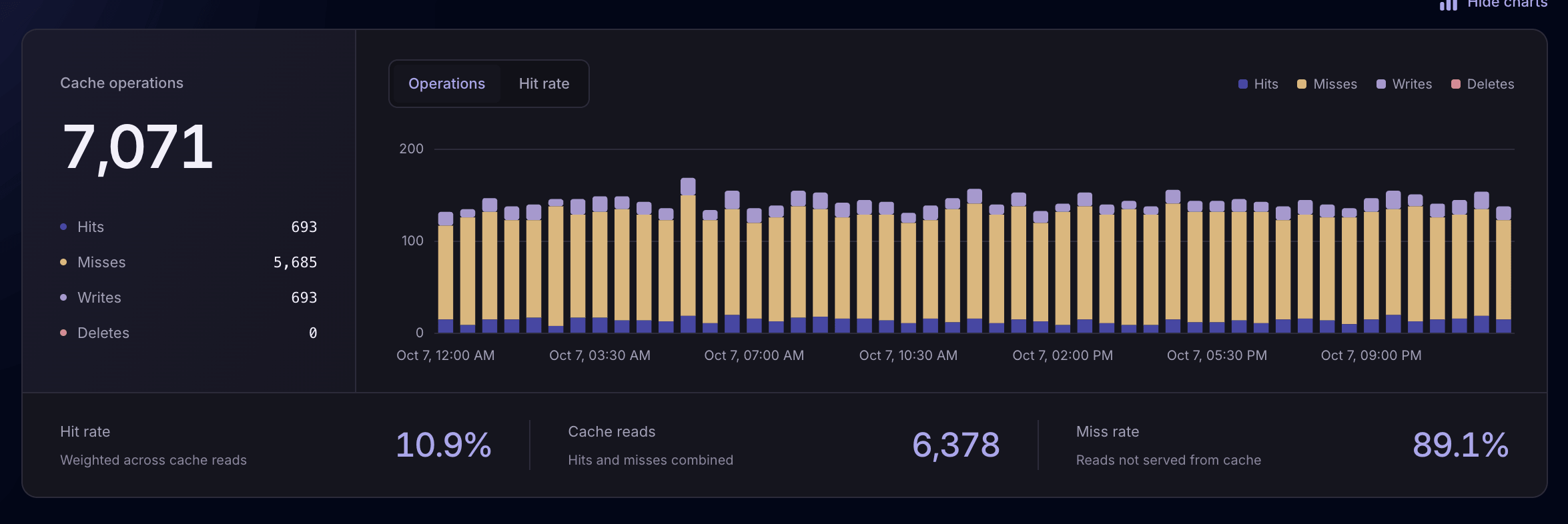
Understand cache usageHits, misses, writes, and deletes over time.
Find keys worth investigatingCompare activity and hit rates by key.
Follow the work around a lookupInspect the originating request or job.
How your app uses the cache
Caching can save your app from repeating database queries, external calls, or calculations. Laritor shows recorded cache activity so you can check whether the data your app needs is being found and reused.
A miss can be expected when a key is new, expired, or removed. Use the surrounding activity to decide which patterns need attention.
Your app found the item it was looking for in the cache.
The item was not found. Your app may need to fetch or calculate it.
Your app stored an item in the cache for later use.
Your app removed an item from the cache.
Cache key insights
Switch to By key to compare hits, misses, writes, deletes, and hit rate for each recorded key. Search for a name or prefix and focus on the period you want to investigate.
Look at both usage and hit rate. A frequently read key with repeated misses may be a better starting point than a rarely used key with a low percentage.
Explore grouping by cache key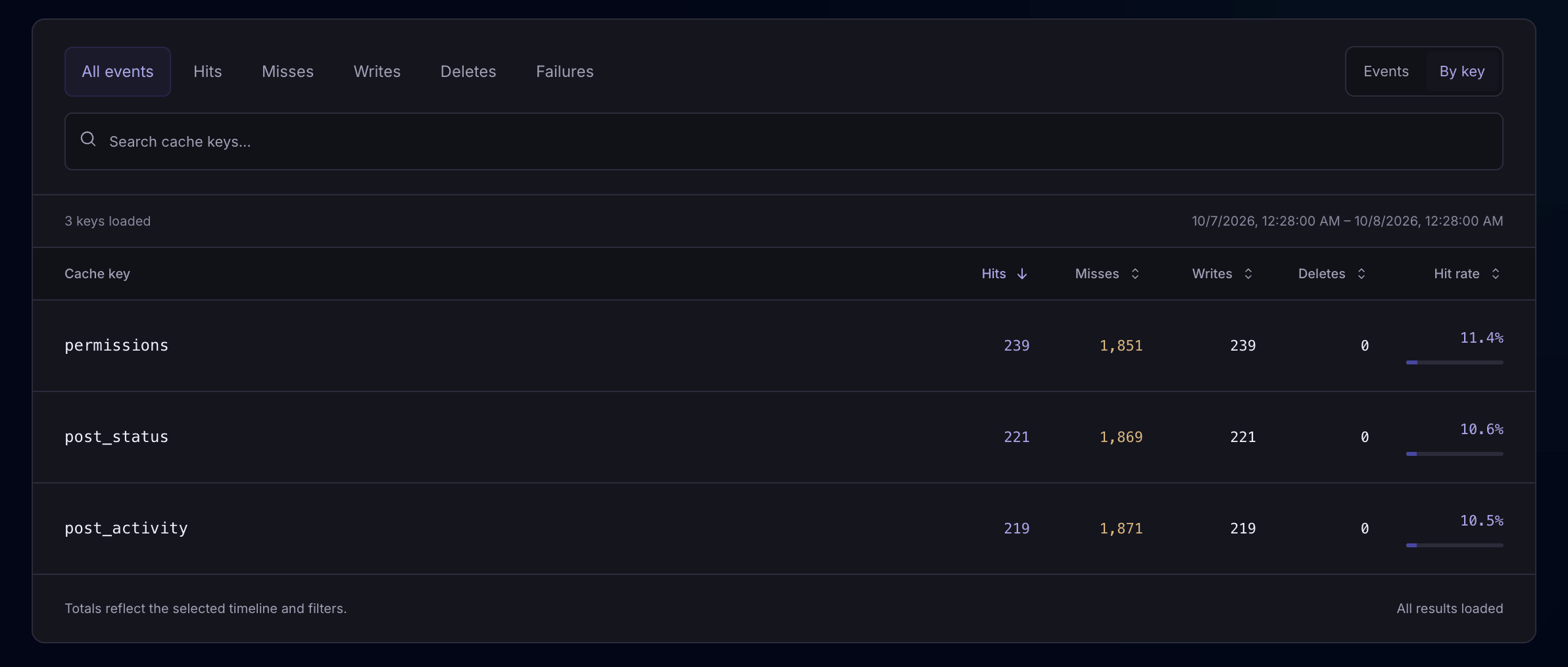
Compare miss counts and hit rates to find keys worth investigating. A heavily used key with repeated misses may create extra database or API work.
Look at how often keys are written or removed. Use the related executions to check whether data is being replaced or invalidated more often than intended.
After changing cache logic or an expiration time, compare the key’s behavior when the affected workflow runs again. Account for changes in traffic.
Individual cache operations
Open the Events view to inspect individual operations with their key, time, duration, and origin. Filter by operation and search for a key to follow the activity you care about.
Use the origin link to open the request, job, command, or scheduled task that used the key, then inspect the surrounding recorded events.
Explore cache event filters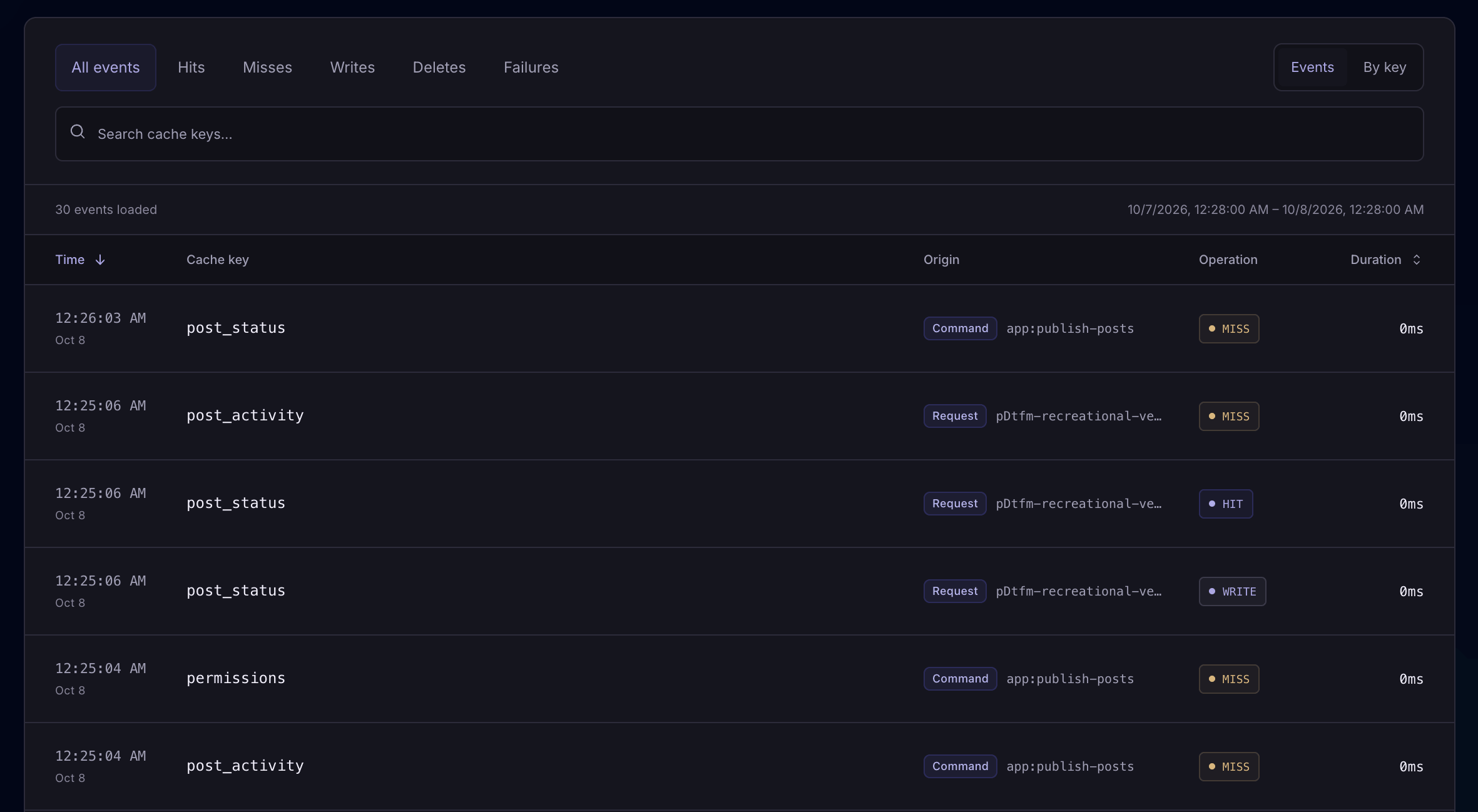
Read-based cache hit rate
Hit rate is the share of recorded cache reads that find an item. Laritor shows the trend over time and an overall rate weighted across reads, so heavily used keys contribute according to their activity.
Use the trend to investigate a change in cache behavior, then look at individual keys and their related executions to understand it.
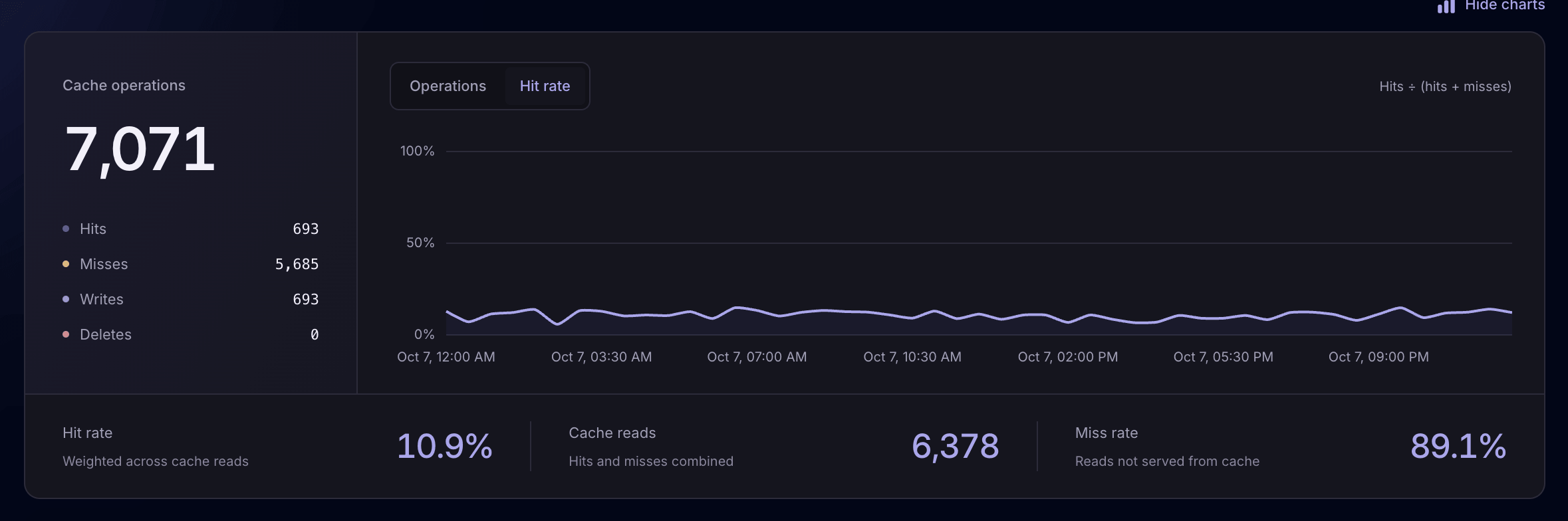
These metrics describe recorded activity. Full observability includes successful activity for a broader picture; exceptions-only and issue tracker modes show events from retained occurrences.
Cache activity in execution context
Open an event’s originating execution to follow the recorded queries, API calls, logs, exceptions, and other operations around the lookup. See whether a miss led to extra work or was part of an expected refresh.
Check how your code builds and populates the key, how long it keeps the data, and what causes the item to be removed.
Example: loading data when a cache key is missing
A practical cache investigation
Use the recorded activity to choose what to investigate. Changes to keys, expiration, or invalidation should preserve the freshness your app needs while reducing unnecessary work.
Search for a key or prefix, select a date range, and compare hits and misses. Start with keys used by a workflow you want to improve.
Open a recorded event’s originating execution. Inspect related queries, API calls, logs, and other events to see what work followed the lookup.
Check how your app builds, populates, expires, and invalidates the key. Test the change, then compare cache behavior and the affected workflow’s performance.
Use Laritor how you want
Choose which occurrences to record. Each retained request or job includes its related cache events and other activity, subject to your filters. Use full observability when you also want to compare successful executions.
Compare modes and estimate your costKeep cache events and other related activity when a request, job, command, or task contains an exception. Use the recorded context to investigate the failure.
A cache miss on its own does not mean an exception occurred.
Record occurrences with detected issues, such as a slow request or failed job. Inspect their cache activity alongside queries, logs, and other events.
Focus on cache behavior around application problems.
Record successful activity too. Monitor cache usage across your app and compare hit rates, key activity, and individual executions over time.
Use this for a broader picture of cache behavior.
Cache operations and other related events count toward usage. Paid plans start at $20/month with 20 million events included. Sending fewer events can reduce additional charges.
Recording and privacy controls
Cache key names can contain user identifiers, email addresses, or other private strings. Review the data your app sends and customize filters and redaction before it leaves your servers.
Explore redaction settingsUse your recording mode and custom filters to retain the cache activity needed for investigation.
Use the recordCacheHit hook to filter cache events. Review the available overrides when configuring your app.
Mask or remove sensitive strings and fields in the client. Keep the context your team needs without sending unnecessary personal information.
Common questions
Hits, misses, keys, recorded events, and choosing what to monitor.
Laravel cache monitoring helps you understand how your application uses its cache: which keys it reads, whether those reads are hits or misses, and when it writes or deletes items. Laritor shows recorded cache operations, hit-rate trends, per-key totals, and the request, job, command, or scheduled task behind an event.
A hit means the requested item was found in the cache. A miss means it was not found, so your code may need to fetch or calculate the data. A miss is not automatically an error. It can be expected after expiration, invalidation, or the first lookup of a key.
Hit rate is hits divided by hits plus misses, multiplied by 100. For example, 80 hits and 20 misses give an 80% hit rate. Writes and deletes are not included in the read-based calculation. Laritor’s overall hit rate is weighted across recorded reads, rather than an average of each key’s percentage.
Use Laritor’s By key view to compare hit counts, miss counts, writes, deletes, and hit rates. Search for a key name or prefix and select the period you want to inspect. Consider both usage and hit rate when choosing a key to investigate, then open individual events to see their execution context.
Yes. Recorded cache events show the key, operation, time, duration, and originating execution. Follow the origin link to the HTTP request, queued job, Artisan command, or scheduled task to inspect related queries, logs, outbound requests, exceptions, and other events.
Not necessarily. Cache hit rate describes lookup outcomes, not the time saved by caching. Investigate how frequently a key is used and what work happens after a miss. Compare the affected request or job’s queries, API calls, and timing before deciding what to change.
Yes. The cache view includes recorded hits, misses, writes, and deletes. Inspect event trends or compare per-key counts to investigate when items are populated, replaced, or removed. The data available depends on the recording mode and filters you use.
You can inspect related cache events in exceptions-only or issue tracker mode when the originating occurrence is retained. Full observability also records successful activity, which gives a broader picture of cache usage and hit rates. Metrics reflect the events you send, so recording modes and filters affect the results.
Yes. The Laravel client provides recording filters, including the recordCacheHit hook, and customizable redaction before data is sent. Cache key names can contain user identifiers or other sensitive strings. Review the information your app sends and configure filters and redaction to preserve useful context while protecting private data.
Connect your coding agent through Laritor MCP. It can retrieve an exception and its recorded execution timeline, including related cache operations when available. The agent can use those events with your repository to investigate the failure and work on a fix.
Install in under 1 minute
Install Laritor’s Laravel package, connect your app, and choose what to record. Inspect cache keys, follow hits and misses, and understand the work behind each lookup.
Free trial: 300K events · Unlimited apps and users