
Laritor
Yes
Laritor vs Laravel Nightwatch
Track exceptions, find issues, and improve performance with Laritor. Get customizable dashboards, deeper debugging context, in-app AI, and more included events for $20/month, with no separate ingestion agent to maintain.
Published by Laritor · Comparison checked · View comparison notes
Designed primarily for Laravel. All tools compared here support Laravel.
Yes
Yes
Why choose Laritor over Nightwatch?
Laritor combines Laravel exception tracking, issue tracking, and performance monitoring with tools to understand your users, your infrastructure, and your business workflows.
The full feature comparison
Compare 49 capabilities. See where Laritor gives you more, where Nightwatch has an advantage, and what both tools offer.
This table compares dedicated product features and built-in monitoring views. Execution context metadata and custom user profile fields are shown separately.
More ways to understand your app, deeper debugging context, and simpler monitoring setup.
| Capability | Laritor | Laravel Nightwatch |
|---|---|---|
| Customizable dashboards | 85+ widgets Unlimited dashboards with 85+ widgets. Add, move, and resize charts for each team’s needs. | Single predefined dashboard with no customization. |
| Feature flag performance | Dedicated flag insights Automatic Pennant evaluation tracking, activation rates, related errors, and execution durations. | Not supported. |
| Custom events | Your business workflows Record named events with metadata for checkout steps, payments, imports, and other business workflows. | Not supported. |
| Custom health checks | Built-in health checks Define application checks, monitor their status and history, and receive failure alerts. | Not supported. |
| Server metrics (CPU / disk / memory) | Infrastructure context CPU, memory, and disk charts alongside application monitoring. Requires optional scheduled collection. | Not supported. |
| Job wait time insights | See queue bottlenecks Separate dispatch delay, queue wait, and execution time. Compare connections, queues, and job types. | Not supported. |
| Database schema explorer | Schema-aware debugging Browse tables, columns, indexes, and foreign keys, with schema-aware AI assistance. | Not supported. |
| Custom PDF reports | Reports without logging in Customize daily or weekly performance reports, receive them by email, and share PDF snapshots. | Not supported. |
| Dedicated suspicious / bot filters | Dedicated traffic views Dedicated suspicious and bot traffic views, filters, and a customizable bot detection rule. | Not supported. |
| Session journeys | Follow a user’s journey Follow recorded requests within a session and inspect the related user, exceptions, and custom events. | Not supported. |
| Percentile metrics | More duration percentiles P50, P90, P95, and P99 request durations to see typical and slower experiences. | P95 and average execution durations in the documented views. |
| AI-based optimizations | In-app optimization guidance In-app AI for exceptions, requests, queries, and schema, plus MCP for exception context and recorded timelines. | MCP for exceptions and performance issues; AI-generated exception descriptions. |
| AI provider choice | Use your preferred provider 50 included AI prompts/month; connect Anthropic, DeepSeek, Ollama, OpenAI, xAI, zAI, or Gemini for more usage. | MCP works with compatible AI clients; bring-your-own-provider settings for in-app AI are not listed. |
| Capture request headers, payload, and response | Request and response details Choose request and response headers and bodies for retained requests. Body recording is disabled by default. | Request headers captured by default; payload captured only for exceptions. Response body not captured. |
| Capture session data | More request context Record session data with requests, with controls to omit fields and redact sensitive values. | Not supported. |
| Capture outbound request headers, payload, and response | Inspect external API data Optional request and response headers and bodies for external API calls, with field controls and redaction. | Payload and response body not captured. |
| Capture command / scheduled task output | Read what the command printed Read captured console output alongside the execution timeline and related events. | Output not captured. |
| Custom user profile metadata | Custom user attributes such as role, team, plan, organization, and region, alongside user activity. | Not supported as custom user profile fields. Execution metadata can be added through Laravel Context. |
| Custom log ingestion | Bring other logs together Send custom logs programmatically, including logs your own collection code reads from infrastructure sources. | Not supported. |
| Exception tracker issue tracker, or full observability | Choose a ready-made mode Three ready-to-use filters. Retained executions include their related recorded events. | Configure sampling and filters; exception traces can be preserved independently of request sampling. |
| Alert channels | More native integrations Email, Slack, Discord, Microsoft Teams, Telegram, and webhooks. Create issues in GitHub and Linear. | Email, Slack, webhooks, and Linear are listed integrations. |
| Events ingestion | No ingestion agent to maintain Composer client without a separate continuously running ingestion agent. | Composer package plus an actively running Nightwatch agent. |
| Server / infrastructure changes | Fewer moving parts Configure credentials and run laritor:sync after deployment. No agent process monitor required. | Keep the agent running with a process monitor or container setup; hosting integrations can handle this. |
| Serverless / Laravel Vapor support | No extra agent server Supported by the client without a separate ingestion agent server. | The documented Vapor setup requires a long-running compute instance to host the agent. |
| Auto scaling support | Simpler deployment setup Deploy the client with your app; no separate ingestion agent to provision for application events. | Supported through an agent deployment topology, including Docker and Kubernetes configurations. |
| Supported Laravel versions | Supports Laravel 9 Laravel 9–13, subject to your framework and client version requirements. | Laravel 10+; feature availability varies by framework version. |
| Supported PHP versions | Supports PHP 8.0 and 8.1 PHP 8.0–8.5, subject to your Laravel and client version requirements. | PHP 8.2+. |
| Pricing | 2.67× included events vs Pro $20/month for 20M billable events. $0.20 per additional 100K. | Pro: $20 for 7.5M; Team: $60 for 30M; Business: $300 for 180M events/month. |
| Additional event pricing | Lower overages vs Pro & Team $0.20 per 100K billable events. | $0.35 per 100K on Pro and Team; $0.20 on Business; $0.50 on Free. |
Built by the Laravel team, with longer retention, built-in issue collaboration, and more region options.
| Capability | Laritor | Laravel Nightwatch |
|---|---|---|
| Official brand value | An independent monitoring product built for Laravel applications. | The official monitoring product built by the Laravel team. |
| Issue management | A dedicated Issues view for operational problems, exception groups, alerts, and GitHub or Linear issue creation. | Issue assignment, comments, priorities, statuses, and performance thresholds. |
| Supported regions | US (New York City) and EU (Amsterdam). | US, EU, and Australia. |
| Free trial / free plan | One-time trial with 300K events and 14-day retention. | Free plan with 300K events/month and 14-day lookback. |
| Data retention | 14 days in the trial; 30 days on the listed paid plan. Contact us for custom requirements. | Free: 14 days; Pro: 30; Team: 60; Business: 90. |
Core monitoring and team capabilities supported by both tools. The details and workflows can differ.
| Capability | Laritor | Laravel Nightwatch |
|---|---|---|
| Filtering / redacting | A dedicated filter class with per-event, payload, header, body, context, and redaction controls. | Granular event filters, redaction callbacks, and sensitive header/payload defaults. |
| Requests monitoring | Request details, route metrics, timelines, failure filters, and performance insights. | Supported, with route metrics and request traces. |
| Commands / scheduled tasks monitoring | Execution status, duration, output, related events, and scheduled task health. | Supported, with command and scheduled task traces. |
| Queued jobs monitoring | Processed, waiting, and failed jobs, execution details, and queue performance. | Supported, with queued, processed, released, and failed counts. |
| Logs / exceptions monitoring | Grouped exceptions, stack traces, source context, and searchable logs. | Supported, with exception occurrences, stack traces, and structured logs. |
| Database queries monitoring | SQL, bindings, durations, related executions, and N+1/duplicate query insights. | Supported, with query details and execution context. |
| Outbound requests monitoring | External API timings, response codes, related executions, and optional captured payloads. | Supported, with host-level metrics and individual call timings. |
| Cache / mails / notifications monitoring | Dedicated views and related execution events for cache operations, mail, and notifications. | Supported event types, linked to their execution context. |
| Sampling & filtering | Keep selected executions and events with customizable filters. | Global, route-based, and dynamic sampling with granular event filtering. |
| Events timeline | Inspect the order and timing of related events within a retained execution. | Connected events within request, command, and task traces. |
| Multiple organizations / teams | Manage applications and team access across organizations. | Create or join multiple organizations and manage team members. |
| Applications / environments | Unlimited on the listed plan. | Unlimited on the listed plans. |
| Seats / users | Unlimited on the listed plan. | Unlimited on the listed plans. |
| Support | Email and Discord. | Email support on Pro and Team; priority support on Business. Check its pricing page for current Free plan support. |
| Supported color scheme | Light and dark. | Light and dark. |
Major difference
Laritor gives you more ways to understand your Laravel application while keeping monitoring costs down. Get deeper application views, dashboards you can customize, and no separate ingestion agent to maintain.
Laritor costs $20 per month at this volume, compared with $60 for Nightwatch Team, its lowest-cost paid plan at 20M events. That leaves more of your budget for your application.
Laritor adds backend session journeys, Pennant performance insights, custom business events, API payload and response views, and scheduled PDF reports. Nightwatch’s predefined views do not offer the same dedicated depth.
Install Laritor’s Composer client without supervising a separate ingestion process. Nightwatch requires an actively running agent, adding deployment and process management work unless your hosting integration handles it.
The example assumes 20M billable events per product. Laritor includes 30-day retention; Nightwatch Team includes 60 days. Actual billable counts and costs depend on recording settings.
Why choose Laritor over Nightwatch?
More included events, dashboards you can customize, and detailed application context, with fewer services to maintain.
Laritor: $20.00 · Nightwatch Team: $60.00. Save $40.00 a month at 20M billable events per product.
Team is Nightwatch’s lowest-priced listed plan at this volume and includes 60-day lookback. Laritor includes 30-day retention. For 30-day lookback, Nightwatch Pro would cost $63.75. Billable counts can differ by product and recording settings.
Cost calculator
Enter your monthly activity and average event count to estimate the cost of Laritor and Nightwatch.
Monthly saving with Laritor$40.00
Both estimates use the same event count. Nightwatch starts with Pro and uses the lowest-cost paid plan for your volume, including additional events when needed; lookback varies by plan. Prices are in USD before tax, after any trial. Actual costs depend on each product’s billable events, data sizes, and recording settings.
Check server resources alongside application activity to find performance bottlenecks.
Server resource monitoring
Laritor shows server CPU, memory, and disk usage alongside application monitoring. When requests become slow or queues back up, check resource trends as part of the same investigation instead of opening a separate infrastructure monitoring tool.
Server metrics are optional and require scheduled collection. A dedicated server resource monitoring feature is not listed in Nightwatch’s documentation. Laritor gives you this additional view when your team needs it.
A status code or stack trace tells you where to start. The data around it helps you understand why it happened.
Outbound request payloads & responses
Laritor can capture outbound request headers and bodies, response headers, and response bodies. Inspect them alongside the originating request, job, command, or scheduled task to investigate expired credentials, unexpected response formats, validation failures, and other API problems.
Nightwatch documents outgoing call status codes and timings, but does not list payload or response body capture. With Laritor, the optional captured data helps explain an API failure without reproducing the original call. Bodies are disabled by default; enable the fields you need and configure redaction.
Application & custom logs
Both tools link Laravel application logs to their execution context. Laritor also provides a programmatic helper for sending custom logs. Your own collection code can read Nginx access or error logs, MySQL logs, or another source and forward useful entries to Laritor.
This keeps those messages in the same place as application activity. Nightwatch documents Laravel logging channels and custom stacks; it does not list an equivalent standalone ingestion helper for infrastructure log sources. Laritor does not automatically read these files. You control collection and delivery.
Request payload & data
Laritor lets you choose request context, query parameters, request headers and bodies, response headers and bodies, and session data for retained requests. You can investigate successful but incorrect responses and slow requests as well as exceptions, depending on your recording mode.
Nightwatch captures request headers and can optionally capture payloads when an exception occurs. Laritor’s separate field controls give you more options for inspecting what entered your app and what it returned. Body recording is disabled by default, and sensitive values pass through redaction before ingestion.
Commands & scheduled tasks
Both tools monitor Artisan commands and scheduled task executions. Laritor also displays captured console output alongside status, duration, exceptions, queries, and the other recorded events from the run.
If an import stopped halfway, a backup failed, or a scheduled command printed an unexpected result, read what it reported directly in Laritor. Nightwatch’s command and scheduled task guides describe traces and performance metrics, but do not list console output capture.
Debug with your AI agent
Laritor MCP lets your agent retrieve exception details and the recorded execution timeline. It can inspect those events alongside your code to investigate the cause and work on a fix. In-app AI recommendations are available too.
Use the same recorded exception context inside Laritor or in your AI coding workflow. Choose your in-app AI provider ↗
Read the Laritor MCP guide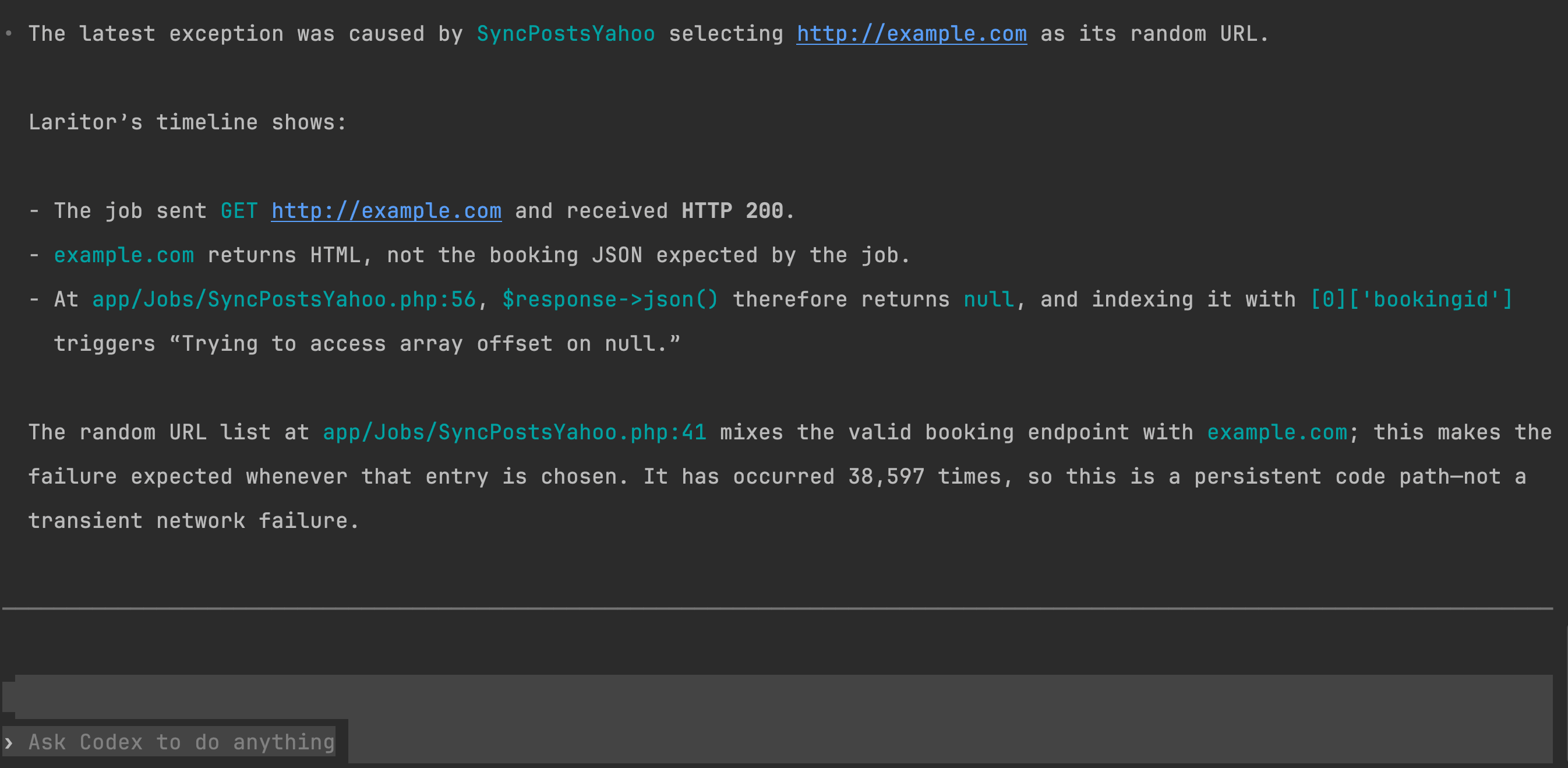
Laritor gives your team more ways to understand performance, infrastructure, and the workflows specific to your business.
Custom dashboards and visualizations
Create unlimited Laritor dashboards using 85+ widgets. Arrange and resize charts for engineering, operations, product, individual applications, or specific environments. Combine request performance, queues, errors, custom events, and business metrics in one view.
Nightwatch presents a built-in application dashboard; a custom dashboard builder is not listed. Laritor lets you shape the view around your workflow rather than relying on a predefined overview. Live dashboard settings also support an auto-refresh interval and a default time range.
Job & queue insights
Laritor shows processed, waiting, and failed jobs across connections, queues, and job types. Compare average execution time and queue wait time, then inspect a job’s dispatch delay, wait for a worker, and execution duration separately.
Nightwatch also aggregates queued, processed, released, and failed jobs and shows average/P95 execution times. Laritor’s dedicated queue views and timing breakdown help you decide whether to investigate worker capacity, a growing backlog, or slow code inside the job.
Feature flag insights
Laritor automatically captures Laravel Pennant evaluations, including active and inactive results. Review activation rates and recorded usage over time, then compare execution durations and errors around the outcomes. Open related executions to investigate the queries, API calls, and exceptions behind a change.
Nightwatch lets you attach feature flag states through Laravel Context, but does not list dedicated feature flag analytics. Laritor provides a view built for evaluating a rollout. Its metrics describe recorded checks, so use full observability for a broader comparison and account for differences in workload.
Custom events
Record custom events for checkout steps, payment attempts, synchronization progress, retries, or fallback paths. Add metadata such as a cart ID, provider, record count, or tenant to explain each occurrence.
Laritor places those named events in the recorded execution timeline, helping you understand the workflow alongside framework activity. Nightwatch supports custom Context metadata, but a dedicated custom event type is not listed. Combine Laritor custom events with session journeys to investigate the steps across recorded user requests.
Performance in context
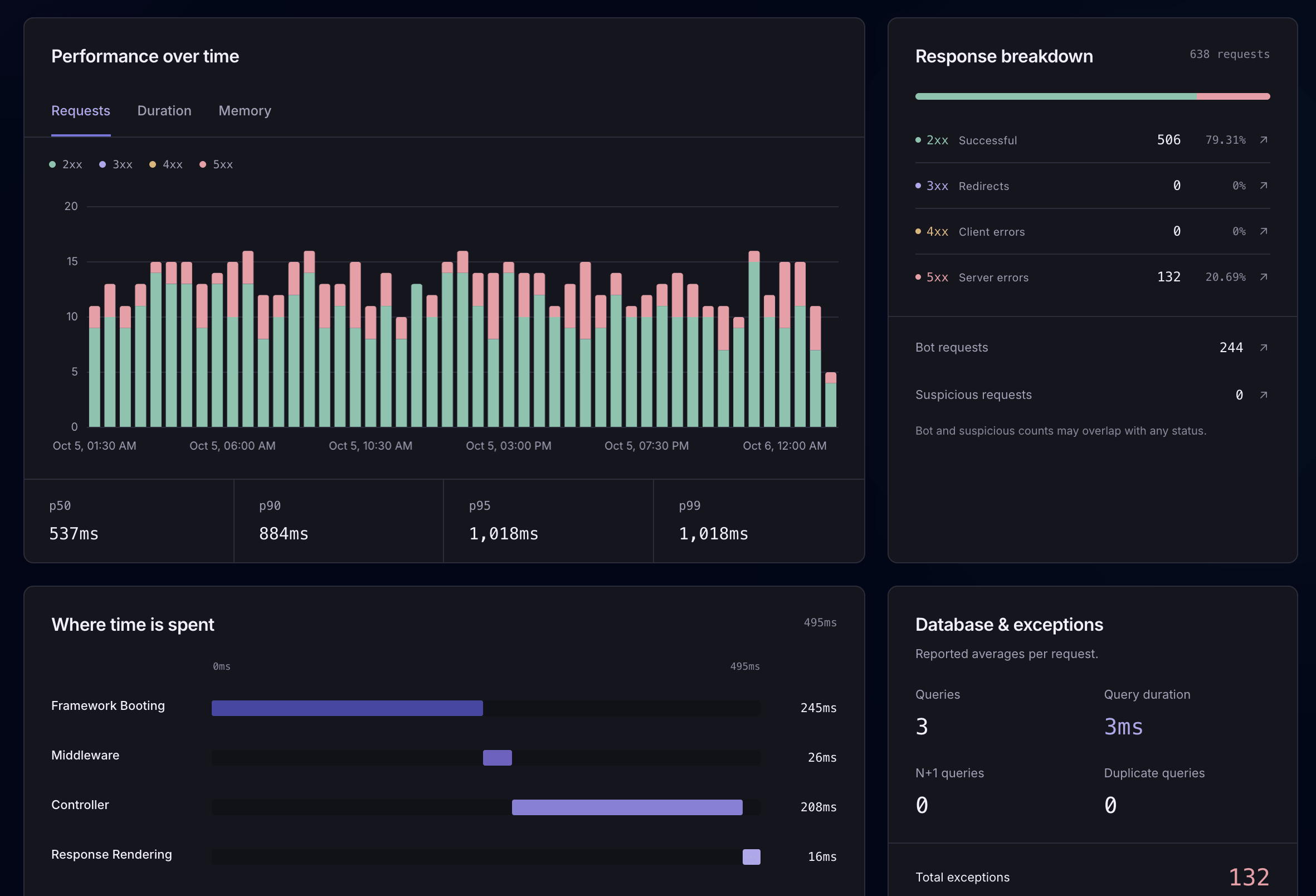
Review request volume, status codes, duration percentiles, and where time is spent. Open a retained request to inspect its queries, logs, API calls, and other recorded events. Explore request monitoring
Bring monitoring into the tools your team already uses, and keep a record of performance without opening the dashboard.
Alert channels
Laritor supports email, Slack, Discord, Microsoft Teams, Telegram, and webhooks. Create GitHub or Linear issues from your investigation, so the context follows the problem into the tools your team uses to plan and fix work.
Nightwatch lists email, Slack, Linear, and webhooks. Laritor’s additional native integrations give teams more choice without building their own webhook receiver. Customize alert rules and filters to keep notifications focused on the problems that matter.
For a regular overview, schedule daily or weekly PDF reports with selected performance metrics. Receive them by email, keep historical snapshots, or share them with teammates. Dedicated custom PDF report scheduling is not listed in Nightwatch’s documentation.
Evaluate Laritor in your app
Use a representative app or environment to compare the details you receive, recording volume, and debugging workflow.
Create a Laritor account, install the Composer package, add your ingest endpoint and key, and run the sync command.
composer require binarybuilds/laritor-clientStart with exception tracker, issue tracker, or full observability. Register the generated filter, then review the data and privacy settings for your app.
Configure recording filtersInspect a known exception or slow execution, test alert delivery, and compare measured overhead and billable event usage. If you run both tools, include their combined collection work in your evaluation.
Explore exception investigationCreate your dashboards, choose alert channels, schedule reports, and connect AI. Keep existing Nightwatch history available for its retention period while Laritor builds a new record of your application’s activity.
Explore Laritor guidesQuestions before switching
Yes. Laritor is an independent Laravel exception tracker, issue tracker, and performance monitoring tool. Both products connect Laravel events to requests and other executions. Choose Laritor for customizable dashboards with 85+ widgets, richer optional payload capture, in-app AI with provider choice, session journeys, scheduled PDF reports, and application event ingestion without a separate agent.
Yes. Exceptions-only mode retains an execution when an exception occurs, along with its related recorded events. You can inspect the stack trace and the queries, logs, API calls, and other events around the failure. Successful executions without exceptions are excluded by this filter.
No. Nightwatch supports sampling and granular event filtering. Its exception sampling can preserve a request trace when an exception occurs, even when that request would otherwise be sampled out. Laritor provides named exceptions-only, issues-only, and full observability filters.
Laritor includes more events at the same $20 starting price and has lower overage rates than Nightwatch Pro and Team. Your actual saving depends on billable usage and the plan you need. At 20 million billable events per product, Laritor’s paid plan is $20 and Nightwatch Team is $60 before taxes. Recording settings and Laritor’s 2 KB event-size increments affect actual usage; compare each product’s billable count rather than request counts.
Laritor does not require a separate continuously running agent for application event ingestion. Install the Composer client, configure its endpoint and key, and run laritor:sync after deployments. Optional server resource metrics need scheduled collection. Nightwatch requires its ingestion agent to remain active.
Yes. Laritor has in-app AI and a read-only MCP server for investigating exceptions with recorded execution context. Nightwatch MCP supports exceptions, performance issues, status updates, and comments. Laritor also offers in-app guidance for requests, queries, and schema, with 50 included prompts per month and the option to connect your own AI provider.
Laritor’s listed paid plan retains data for 30 days, and its free trial retains data for 14 days. Nightwatch’s listed plans offer 14, 30, 60, or 90 days of lookback. Choose the retention period you need before comparing costs; the lowest-price plan may have a shorter lookback.
Yes. You can run Nightwatch and Laritor in parallel in the same Laravel application.
Yes. Try Laritor with 300K events free in a representative app or environment. Check recorded traces, alerts, performance overhead, billable usage, and privacy settings before changing your existing monitoring setup. Running both tools adds collection work, and Laritor does not list an automatic import of Nightwatch history.
Laritor lists Laravel 9 through 13 and PHP 8.0 through 8.5 as supported. Your Laravel version and installed client still determine which runtime versions and features are available. Nightwatch’s documented minimum is Laravel 10 and PHP 8.2.
About this comparison
Published by Laritor. Nightwatch capabilities and public monthly pricing were reviewed on . The table compares dedicated product features; the detailed explanations cover relevant recording controls and context options.
Costs depend on the billable data you send, payload sizes, recording settings, and selected plan. Retention values follow each product’s listed plan.
Start with the data you need
Track exceptions, detect issues, and monitor performance.
Try Laritor with 300K events free.